

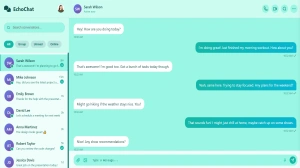
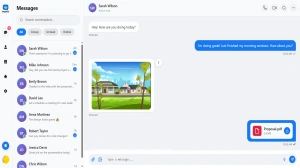
Free Chat Templates: HTML, CSS, Bootstrap & React UI Designs
Discover the ultimate collection of 150+ free chat templates built with HTML, CSS, Bootstrap, and React. Download premium chatbot UI designs, customer service templates, and AI chat interfaces - all completely free with no signup required.
Complete Chat Template Technology Stack
Choose from HTML/CSS, Bootstrap, or React templates. Each technology offers unique advantages for different project requirements and skill levels.
Complete Technology Guide Contents
- Technology Stack Overview
- HTML/CSS Chat Templates
- Bootstrap Chat Templates
- React Chat Components
- Template Categories by Technology
- AI Chatbot Templates (All Technologies)
- Customer Service Chat Templates
- E-commerce Chat Templates
- Mobile-Responsive Designs
- Technology-Specific Customization
- Performance Comparison
- Platform Integration by Technology
- Technology-Specific Best Practices
- Migration Between Technologies
- Technology-Specific Troubleshooting
- Technology FAQ
Technology Stack Overview: Choosing the Right Foundation
Selecting the appropriate technology stack for your chat template is crucial for project success, development efficiency, and long-term maintainability. Each technology offers unique advantages and considerations that make them suitable for different use cases, team skills, and project requirements. Understanding these differences helps ensure you choose the optimal foundation for your chat implementation.
Technology Selection Criteria
The choice between HTML/CSS, Bootstrap, and React depends on several key factors including team expertise, project complexity, performance requirements, and long-term maintenance considerations. Each technology stack offers distinct advantages that make them suitable for different scenarios and business needs.
HTML/CSS templates provide maximum compatibility and customization flexibility, making them ideal for projects requiring specific design implementations or integration with legacy systems. Bootstrap templates offer rapid development with responsive design built-in, perfect for teams needing quick deployment with professional results. React templates provide modern, interactive experiences with component reusability, ideal for complex applications requiring dynamic functionality.
| Feature | HTML/CSS | Bootstrap | React |
|---|---|---|---|
| Learning Curve | Low | Medium | High |
| Development Speed | Medium | Fast | Medium |
| Customization | Maximum | High | High |
| Performance | Excellent | Good | Good |
| Interactivity | Basic | Medium | Advanced |
| Maintenance | Easy | Easy | Medium |
Browser Compatibility and Support
All our chat templates are designed with broad browser compatibility in mind, but different technologies offer varying levels of support for older browsers and devices. HTML/CSS templates provide the widest compatibility, supporting even legacy browsers with graceful degradation. Bootstrap templates offer excellent modern browser support with responsive features. React templates focus on modern browsers but provide polyfills for broader compatibility when needed.
The compatibility considerations extend to mobile devices, assistive technologies, and emerging platforms. Each technology stack is tested across major browsers including Chrome, Firefox, Safari, and Edge, with specific attention to mobile Safari and Chrome mobile for optimal mobile experiences.
Technology Recommendations by Use Case
- Simple Business Websites: HTML/CSS templates for maximum compatibility
- Rapid Prototyping: Bootstrap templates for quick development
- Complex Applications: React templates for advanced interactivity
- E-commerce Sites: Bootstrap or React for responsive commerce features
- Enterprise Applications: React templates for scalable architecture
HTML/CSS Chat Templates: Pure Web Standards
HTML/CSS chat templates represent the foundation of web development, offering maximum compatibility, customization flexibility, and performance optimization. These templates are built using semantic HTML5 and modern CSS3 features, ensuring they work across all browsers and devices while providing complete control over design and functionality.
Advantages of HTML/CSS Templates
Pure HTML/CSS templates offer several unique advantages that make them ideal for specific use cases and requirements. They provide the smallest file sizes, fastest loading times, and maximum compatibility across all browsers and devices. The absence of framework dependencies means these templates can be easily integrated into any existing website or application without conflicts.
Advantages
- Maximum browser compatibility
- Smallest file sizes and fastest loading
- Complete customization control
- No framework dependencies
- Easy integration with any system
- SEO-friendly semantic markup
Considerations
- More manual coding required
- Limited built-in components
- Responsive design requires more work
- Advanced interactions need JavaScript
- Longer development time for complex features
HTML/CSS Template Features
Our HTML/CSS chat templates include modern web standards and best practices, featuring semantic HTML5 markup, CSS Grid and Flexbox layouts, CSS custom properties for theming, and progressive enhancement for advanced features. The templates are designed to be accessible, performant, and easily customizable.
CSS Architecture and Organization
Our HTML/CSS templates use modern CSS architecture principles including BEM methodology for class naming, CSS custom properties for theming, modular CSS organization, and mobile-first responsive design. The CSS is organized into logical sections for easy maintenance and customization.
Accessibility and Semantic Markup
HTML/CSS templates prioritize accessibility through semantic HTML5 elements, proper ARIA labels, keyboard navigation support, and screen reader compatibility. The templates follow WCAG 2.1 guidelines and are tested with assistive technologies to ensure inclusive experiences.
Accessibility features include proper heading hierarchy, descriptive alt text for images, keyboard-accessible interactive elements, and appropriate color contrast ratios. The semantic markup ensures that screen readers can properly interpret and navigate the chat interface.
Performance Optimization
HTML/CSS templates are optimized for maximum performance through minimal file sizes, efficient CSS selectors, optimized images, and progressive enhancement. The templates load quickly even on slow connections and provide immediate functionality without waiting for JavaScript frameworks to initialize.
Performance optimizations include CSS minification, image optimization, efficient font loading, and critical CSS inlining. The templates are designed to achieve excellent Core Web Vitals scores and provide fast, responsive user experiences.
Customization and Theming
HTML/CSS templates offer maximum customization flexibility through CSS custom properties, modular architecture, and well-documented code. The templates can be easily modified to match any brand or design requirement without framework constraints.
Customization options include color scheme modification, typography changes, layout adjustments, and component styling. The templates include multiple theme variations and detailed customization guides for common modifications.
Bootstrap Chat Templates: Rapid Development Framework
Bootstrap chat templates leverage the power of the world's most popular CSS framework to provide rapid development, responsive design, and professional styling out of the box. These templates combine Bootstrap's robust component library with custom chat-specific components to create polished, functional chat interfaces with minimal development time.
Bootstrap Framework Advantages
Bootstrap templates offer significant development speed advantages through pre-built components, responsive grid system, utility classes, and consistent design patterns. The framework's extensive documentation and community support make it easy for developers of all skill levels to create professional chat interfaces quickly.
Bootstrap Template Benefits
- Rapid Development: Pre-built components accelerate development
- Responsive Design: Mobile-first grid system included
- Consistent Styling: Professional design patterns built-in
- Extensive Documentation: Comprehensive guides and examples
- Large Community: Extensive support and resources available
- Customizable Themes: Easy color and style modifications
Bootstrap Chat Components
Our Bootstrap chat templates include custom components built specifically for chat interfaces while maintaining Bootstrap's design consistency. These components include chat message bubbles, user avatars, typing indicators, and input forms that integrate seamlessly with Bootstrap's existing component library.
Responsive Grid System
Bootstrap's responsive grid system ensures that chat templates work perfectly across all device sizes without additional media queries. The templates automatically adapt to different screen sizes, providing optimal experiences on desktop, tablet, and mobile devices.
The grid system includes breakpoint-specific classes, flexible column layouts, and responsive utilities that make it easy to create chat interfaces that look great on any device. The templates include mobile-specific optimizations and touch-friendly interactions for mobile users.
Utility Classes and Customization
Bootstrap's extensive utility class system allows for rapid customization without writing custom CSS. The templates can be easily modified using spacing utilities, color classes, typography utilities, and display classes to achieve desired styling quickly.
Theme Customization with SCSS
Bootstrap templates support extensive theme customization through SCSS variables and custom builds. The templates can be easily rebranded by modifying Bootstrap's color palette, typography settings, and component styles to match specific brand requirements.
Customization options include primary color modification, font family changes, border radius adjustments, and spacing modifications. The templates include pre-built theme variations and detailed customization guides for common branding requirements.
JavaScript Integration
Bootstrap templates include optional JavaScript enhancements using Bootstrap's JavaScript components and custom chat functionality. The JavaScript is modular and progressive, ensuring that basic functionality works without JavaScript while enhanced features are available when enabled.
JavaScript features include real-time message updates, typing indicators, emoji insertion, file upload handling, and responsive behavior enhancements. The code is well-documented and easy to modify for specific requirements.
React Chat Components: Modern Interactive Interfaces
React chat templates represent the cutting edge of modern web development, offering component-based architecture, state management, and interactive features that create dynamic, engaging chat experiences. These templates leverage React's powerful ecosystem to provide scalable, maintainable, and feature-rich chat implementations.
React Component Architecture
React templates are built using modern component architecture with functional components, React Hooks, and context API for state management. The modular design makes it easy to reuse components, maintain code, and add new features without affecting existing functionality.
State Management and Data Flow
React templates implement sophisticated state management using React Hooks, Context API, and optional external libraries like Redux or Zustand for complex applications. The state management ensures consistent data flow and enables features like real-time updates, message persistence, and user session management.
State management includes message history, user authentication, typing indicators, online status, and conversation metadata. The templates provide examples of both local state management for simple implementations and global state management for complex applications.
React Template Features
- Component Reusability: Modular components for easy maintenance
- State Management: Hooks and Context API for data flow
- Real-time Updates: WebSocket integration for live messaging
- TypeScript Support: Type safety and better development experience
- Testing Ready: Unit tests and testing utilities included
- Performance Optimized: Memoization and lazy loading
Real-time Communication
React templates include sophisticated real-time communication capabilities using WebSockets, Socket.io, or other real-time libraries. The templates handle connection management, message queuing, and offline synchronization to provide reliable real-time experiences.
Advanced Interactive Features
React templates support advanced interactive features such as emoji reactions, message threading, file uploads, voice messages, and video calls. These features are implemented as reusable components that can be easily integrated into any chat interface.
Interactive features include drag-and-drop file uploads, emoji picker integration, message search and filtering, user mentions and notifications, and keyboard shortcuts for power users. The components are designed to be accessible and work well with assistive technologies.
Performance Optimization
React templates are optimized for performance using React.memo, useMemo, useCallback, and lazy loading techniques. The templates handle large message histories efficiently and provide smooth scrolling and interactions even with thousands of messages.
Performance optimizations include virtual scrolling for large message lists, image lazy loading, component memoization, and efficient re-rendering strategies. The templates are designed to maintain 60fps performance even with complex interactions and animations.
TypeScript Integration
Many React templates include TypeScript support for better development experience, type safety, and code maintainability. The TypeScript definitions provide clear interfaces for props, state, and API responses, making it easier to develop and maintain complex chat applications.
Testing and Development Tools
React templates include comprehensive testing setups with Jest, React Testing Library, and Storybook for component development. The templates provide examples of unit tests, integration tests, and visual regression tests to ensure code quality and reliability.
Development tools include ESLint configuration, Prettier formatting, pre-commit hooks, and development servers with hot reloading. The templates are designed to integrate seamlessly with modern development workflows and CI/CD pipelines.
Template Categories by Technology Stack
Our comprehensive template collection is organized by both technology stack and use case, making it easy to find the perfect template for your specific requirements. Each category includes templates optimized for different technologies while maintaining consistent design quality and functionality across all implementations.
Business and Professional Templates
Professional chat templates are available across all technology stacks, each optimized for corporate environments and business applications. HTML/CSS versions provide maximum compatibility for enterprise systems, Bootstrap versions offer rapid deployment with professional styling, and React versions include advanced features for complex business workflows.
Professional Template Features by Technology
- HTML/CSS Professional Templates (15 available):
- Maximum browser compatibility for enterprise environments
- Lightweight implementation for legacy system integration
- Custom CSS for specific branding requirements
- Semantic markup for accessibility compliance
- Bootstrap Professional Templates (20 available):
- Rapid deployment with professional styling
- Responsive design for multi-device access
- Integration with Bootstrap ecosystem
- Customizable themes for brand consistency
- React Professional Templates (12 available):
- Advanced workflow management features
- Real-time collaboration capabilities
- Integration with business applications
- Scalable architecture for enterprise growth
E-commerce and Sales Templates
E-commerce chat templates are specifically designed to drive sales and improve customer experience during the shopping journey. Each technology stack offers unique advantages for e-commerce implementations, from simple product inquiry forms to complex conversational commerce platforms.
HTML/CSS e-commerce templates focus on fast loading and broad compatibility, essential for maximizing reach and conversion rates. Bootstrap templates provide responsive shopping experiences with built-in commerce components. React templates enable sophisticated conversational commerce with real-time inventory updates and interactive product catalogs.
Customer Service and Support Templates
Customer service templates are optimized for support workflows and agent productivity across all technology stacks. The templates include features such as ticket integration, knowledge base access, and escalation workflows, implemented using the strengths of each technology.
Support template features vary by technology: HTML/CSS versions prioritize accessibility and compatibility with assistive technologies, Bootstrap versions include responsive layouts for agent mobility, and React versions provide real-time collaboration and advanced workflow management.
AI and Chatbot Templates
AI chatbot templates leverage the capabilities of each technology stack to provide intelligent conversational experiences. The templates include integration points for popular AI services and frameworks, with implementation approaches optimized for each technology's strengths.
Industry-Specific Templates
Industry-specific templates are tailored for healthcare, education, finance, real estate, and other specialized sectors. Each industry template includes compliance features, specialized workflows, and industry-appropriate styling implemented using the most suitable technology stack.
Healthcare templates prioritize HIPAA compliance and accessibility, education templates focus on learning management integration, financial templates emphasize security and compliance, and real estate templates include property-specific features and local market integration.
Mobile and Progressive Web App Templates
Mobile-optimized templates are designed specifically for mobile-first experiences and progressive web applications. Each technology stack offers different approaches to mobile optimization, from responsive CSS to native-like React components.
Mobile templates include touch-optimized interfaces, offline capabilities, push notification support, and device-specific features such as camera integration and location services. The implementation approach varies by technology to leverage each stack's mobile capabilities.
Performance Comparison Across Technologies
Performance characteristics vary significantly between HTML/CSS, Bootstrap, and React implementations, each offering different advantages depending on use case requirements. Understanding these performance differences is crucial for selecting the optimal technology stack for your specific needs and constraints.
Loading Speed and Initial Render
HTML/CSS templates consistently provide the fastest loading times due to minimal dependencies and optimized file sizes. Bootstrap templates offer good performance with slightly larger file sizes due to framework inclusion. React templates require additional JavaScript parsing but provide superior interactive performance once loaded.
| Metric | HTML/CSS | Bootstrap | React |
|---|---|---|---|
| Initial Load Time | 0.8-1.2s | 1.2-1.8s | 1.5-2.5s |
| File Size (Minified) | 15-25KB | 45-65KB | 85-150KB |
| Time to Interactive | 1.0-1.5s | 1.5-2.0s | 2.0-3.0s |
| Memory Usage | Low | Medium | Medium-High |
| Runtime Performance | Good | Good | Excellent |
Runtime Performance and Interactivity
While HTML/CSS templates load fastest, React templates provide superior runtime performance for complex interactions and dynamic content updates. Bootstrap templates offer balanced performance suitable for most use cases without the complexity of React.
Runtime performance considerations include message rendering speed, scroll performance with large message histories, real-time update efficiency, and memory management during extended usage. React's virtual DOM provides advantages for frequent updates, while HTML/CSS excels at static content display.
Performance Optimization Strategies by Technology
- HTML/CSS Optimization:
- CSS minification and compression
- Image optimization and lazy loading
- Critical CSS inlining
- Efficient selector usage
- Bootstrap Optimization:
- Custom Bootstrap builds with only needed components
- SCSS compilation optimization
- Utility class optimization
- JavaScript component lazy loading
- React Optimization:
- Component memoization and lazy loading
- Bundle splitting and code optimization
- Virtual scrolling for large lists
- State management optimization
Mobile Performance Considerations
Mobile performance varies significantly between technologies, with HTML/CSS providing the most consistent performance across devices, Bootstrap offering good responsive performance, and React requiring careful optimization for mobile devices with limited processing power.
Mobile-specific performance factors include touch responsiveness, battery usage, data consumption, and performance on older devices. Each technology stack requires different optimization approaches to achieve optimal mobile performance.
Scalability and Large-Scale Performance
Scalability characteristics differ between technologies, with HTML/CSS providing excellent scalability for simple implementations, Bootstrap offering good scalability with framework overhead, and React providing superior scalability for complex, interactive applications.
Large-scale performance considerations include handling thousands of messages, supporting hundreds of concurrent users, managing real-time updates efficiently, and maintaining performance during peak usage periods. The choice of technology significantly impacts scalability approaches and limitations.
Migration Guide Between Technologies
Migrating between different technology stacks is sometimes necessary as project requirements evolve or team capabilities change. Our migration guide provides step-by-step instructions for moving between HTML/CSS, Bootstrap, and React implementations while preserving functionality and improving capabilities.
HTML/CSS to Bootstrap Migration
Migrating from HTML/CSS to Bootstrap typically involves adopting Bootstrap's grid system, replacing custom CSS with Bootstrap classes, and leveraging Bootstrap components for enhanced functionality. This migration usually results in faster development and better responsive design.
Bootstrap to React Migration
Migrating from Bootstrap to React involves converting static HTML to React components, implementing state management, and adding interactive functionality. This migration enables advanced features like real-time updates and complex user interactions.
The migration process includes component identification, state management planning, event handling implementation, and progressive enhancement of functionality. The result is a more maintainable and feature-rich chat implementation.
HTML/CSS to React Migration
Direct migration from HTML/CSS to React represents the most significant architectural change, involving complete restructuring of code into components, implementing state management, and adding modern JavaScript functionality.
This migration requires careful planning of component hierarchy, state management strategy, and feature implementation. The benefits include modern development practices, better maintainability, and advanced interactive capabilities.
Migration Best Practices
- Incremental Migration: Migrate components gradually rather than all at once
- Preserve Functionality: Ensure all existing features work in the new technology
- Improve Performance: Use migration as an opportunity to optimize performance
- Update Dependencies: Ensure all libraries and tools are current
- Test Thoroughly: Comprehensive testing across all browsers and devices
Data and State Migration
Migrating data and state between technologies requires careful consideration of data structures, storage mechanisms, and state management approaches. The migration should preserve user data and conversation history while improving data handling capabilities.
Data migration considerations include conversation history preservation, user preference migration, integration data transfer, and performance optimization during the migration process. Proper planning ensures seamless transitions without data loss.
Testing and Validation
Comprehensive testing is essential during technology migration to ensure that all functionality works correctly in the new implementation. Testing should cover functionality, performance, accessibility, and cross-browser compatibility.
Testing strategies include automated testing setup, manual testing procedures, performance benchmarking, and user acceptance testing. The testing process should validate that the migration improves rather than degrades the user experience.
Technology-Specific Frequently Asked Questions
The choice depends on your specific requirements, team skills, and project complexity. Choose HTML/CSS for maximum compatibility and simple implementations, Bootstrap for rapid development with responsive design, or React for complex, interactive applications. Consider factors such as development timeline, team expertise, performance requirements, and long-term maintenance needs. HTML/CSS is ideal for simple business websites, Bootstrap works well for most standard implementations, and React is best for complex applications requiring advanced interactivity.
Yes, Bootstrap templates are highly customizable through SCSS variables, utility classes, and custom CSS. You can modify colors, fonts, spacing, and components to match your brand identity. The templates include detailed customization guides and multiple theme variations. You can either use Bootstrap's built-in customization options or add custom CSS for specific styling requirements. The modular architecture makes it easy to modify specific components without affecting the overall design.
While basic React knowledge is helpful, our React templates include comprehensive documentation and examples that make them accessible to developers with varying skill levels. The templates use modern React patterns including functional components and hooks, with clear code comments and implementation guides. For developers new to React, we recommend starting with simpler templates and gradually working up to more complex implementations. The modular component structure makes it easy to understand and modify specific features.
Our HTML/CSS templates are designed with broad browser compatibility in mind, including graceful degradation for older browsers. While modern features may not be available in very old browsers, the core functionality remains accessible. The templates use progressive enhancement to provide basic functionality everywhere while offering enhanced experiences in modern browsers. For specific legacy browser requirements, we provide compatibility guides and fallback options.
HTML/CSS templates offer the fastest loading times and smallest file sizes, making them ideal for performance-critical applications. Bootstrap templates have moderate file sizes due to framework inclusion but provide good performance with responsive features. React templates have larger initial bundles but offer superior runtime performance for interactive features. The choice should balance initial loading performance with runtime functionality requirements. All templates are optimized for their respective technologies and include performance best practices.
Many of our React templates include TypeScript support with complete type definitions, interfaces, and development tooling. TypeScript provides better development experience, type safety, and code maintainability for complex chat applications. The TypeScript templates include examples of proper typing for props, state, and API responses. For developers preferring JavaScript, all templates are also available in standard JavaScript versions with the option to migrate to TypeScript later.
Yes, migration between technology stacks is possible with proper planning and execution. Our migration guides provide step-by-step instructions for moving between HTML/CSS, Bootstrap, and React implementations. The migration process involves converting markup and styling to the new technology while preserving functionality and improving capabilities. We recommend incremental migration approaches and provide tools and examples to facilitate smooth transitions between technologies.
Our free templates are released under permissive licenses that allow both personal and commercial use without restrictions. You can use the templates in client projects, commercial applications, and revenue-generating websites without paying licensing fees. The templates can be modified, customized, and redistributed as part of larger projects. However, you cannot resell the templates as standalone products. Some templates may include third-party components with additional attribution requirements, which are clearly documented in the template files.
Our template collection is continuously updated with new designs, security patches, and compatibility improvements. Major updates are released quarterly, with security and compatibility patches released as needed. Each template includes comprehensive documentation and implementation guides. Community support is available through our forums and knowledge base. For businesses requiring additional support, we offer premium support packages that include priority assistance, custom modifications, and dedicated technical consultation across all technology stacks.